
News
Dragonhawk Fold Pro
What Is a Tattoo Pen Machine?
A tattoo pen machine is a rotary tattoo machine built into a pen-shaped body. A small motor inside the body drives a cartridge needle straight in and out, and the cartridge twists into the front of the machine. There is no coil frame, no needle bar, and no separate tube to assemble. If you have ever picked up a thick marker and thought, "this is how a tattoo machine should feel in the hand," that is the idea.
That shape is not just cosmetic. It changes how you hold the machine, how fast you change needles, and what you can fix when something goes wrong. This guide covers what a pen is, how it differs from coil and traditional rotary machines, and what to check before buying.
How a tattoo pen machine works
Inside the body sits a motor, usually a coreless motor on better pens. The motor turns a cam, the cam pushes the needle up and down, and the cartridge controls the return. Each cartridge has its own membrane, which pulls the needle back and keeps ink from travelling up into the machine. That membrane is doing more work than most artists give it credit for: when a cartridge starts spitting ink or running unevenly, the membrane and the needle weld are the first suspects, not the motor.
The needle travel is called the stroke. Stroke is measured in millimetres and it decides how far the needle moves on every hit. A short stroke hits soft and fast. A long stroke hits harder and pushes more ink per pass. Voltage controls speed, not stroke. Turning the voltage up does not turn a 3.5mm pen into a 4.2mm pen, and that confusion causes more bad purchases than any other single misunderstanding in this category.
Most pens take standard cartridges, so you are not locked into one needle brand. Still, check the cartridge system before buying: a pen that only runs well with one maker's cartridges can strand you mid-session when your usual box runs out.
Tattoo pen vs coil vs traditional rotary
All three put ink in skin. They get there differently, and the difference shows up in your hand after four hours, not ten minutes in.
Machine type
How it drives the needle
Feel in the hand
Best for
Tattoo pen
Motor in a pen-shaped body, cartridge needle
Balanced, quiet, low vibration
Fine line, shading, PMU, long sessions
Traditional rotary
Motor with an exposed mechanism, needle bar and tube
Smooth, but bulkier to grip
Artists who like rotary power with classic setup
Coil
Electromagnetic coils pull an armature bar
Strong punch, more vibration and noise
Bold lining and artists who want tactile feedback
A coil talks back: you feel every hit, and some liners prefer that feedback for bold work. A pen is quieter and smoother, suiting fine line, black and grey, and cosmetic work where a heavy hand is a liability. A traditional rotary sits between the two, but you still deal with bars, tubes, and a slower breakdown for cleaning.
None of this makes one type "better" in the abstract. If you line bold traditional work all day and love coil punch, a pen will feel soft. If you do realism, fine line, or PMU, that softness is exactly what you are paying for.
What stroke length actually means in practice
Stroke is the spec most buyers get wrong, because shops list it as a number with no translation:
Stroke
What it suits
Watch out for
2.4–3.0mm
Fine line, PMU, delicate shading
Too soft for solid colour packing
3.5mm
The all-rounder: lining, shading, and light packing
Good first pen if you only buy one
4.0–4.2mm
Colour packing, bold shading, larger magnums
Less forgiving on thin or delicate skin
If you only buy one pen, 3.5mm is the safe centre. If you already own a 3.5mm pen and want a second machine for packing, that is when a 4.0mm or 4.2mm pen earns its place. Adjustable-stroke pens solve the same problem a different way: instead of owning two pens, you turn a dial. The Dragonhawk Fold Pro offers seven strokes from 2.4mm to 4.2mm, so one pen can cover fine line in the morning and colour packing in the afternoon. The catch with any adjustable pen is the lock: check that the stroke setting stays put under load, and re-check it before a long session, because a stroke that drifts mid-tattoo changes your line without warning.
Wireless or wired: the real trade-off
A wireless pen runs on a battery pack at the back of the machine. A wired pen runs through an RCA cable to a power supply. Wireless wins on movement: no cable dragging across your tray, no cable to snag when you reposition around a client, and an easy setup for guest spots and conventions. Wired wins on one thing only, and it matters: the power never runs out.
That is why the battery plan matters more than the number on the box. A milliamp-hour rating is measured under a light load, not under your hand at working voltage with a large magnum. Judge a pen by working time at real settings and by whether you can swap the battery in seconds. The Fold Pro is rated at 4–6 hours from its 1500mAh battery, charges by USB-C in about 1.5 hours, and can also run through an interchangeable RCA connector when the battery is out. That fallback is what lets you finish a session instead of ending it early.
The cleanest full-day setup is two batteries on rotation: one in use, one charging. Our own INKSOUL HV6 Pro ships that way, with two true 2000mAh batteries in the box, plus two grips and two working modes. You are not buying a bigger battery. You are buying the ability to keep working while the other battery charges.
Buying checklist: six things that actually matter
Grip diameter and grip removal. You hold this for hours, so diameter is not a detail. The HV6 Pro ships with 33mm and 38mm aluminium grips, both autoclavable, which lets you find the size your hand actually likes instead of adapting to one fixed grip. Just as important, the grip must come off for proper cleaning. A real-world report from a Mast Archer user in 2026 tells the story: the small screw holding a fixed grip stripped, the grip could not be removed for thorough cleaning, and the machine was effectively scrapped. Before you buy, confirm the grip removes cleanly, check the fixing screw, and keep a spare grip in the drawer. Between clients, many artists also run a disposable pen sleeve over the body; it does not replace grip removal and cleaning, it just keeps the body itself from becoming the dirty part.
Weight and balance, not weight alone. A 200g pen can feel heavier than a 230g pen if the battery hangs off the back and pulls the nose up. The Fold Pro weighs about 200g with its battery. Hold it the way you tattoo, and notice whether your wrist fights to keep the needle level.
Stroke choice. Fixed 3.5mm for a first pen, fixed 4.2mm for a dedicated packing pen, or adjustable 2.4–4.2mm if you want one pen to do both jobs. Skip adjustable if you never change it.
Motor and voltage control. A coreless motor runs smoother and quieter than a cheap brushed motor, and it holds speed better when the needle meets skin. The HV6 Pro also offers two modes: a standard voltage-adjustment mode and a fixed-frequency mode, which is useful if you want the hit rate to stay consistent while you change other settings. Do not chase the highest voltage number; chase consistent behaviour at the voltage you actually work at.
Battery plan. One battery means a hard stop. Two batteries, or an RCA fallback, means a session that finishes. Ask how long charging takes and whether the pen still works while a battery charges elsewhere.
Spare parts and service. Grips, battery packs, and RCA connectors are wear items. A pen with no spare grip or battery available is a pen with a built-in expiry date. Buy where parts are stocked.
Who should buy a pen machine, and who should not
Buy a pen if you do fine line, realism, black and grey, PMU, or long sessions where vibration and wrist fatigue limit you. Buy one if you want fast cartridge changes between clients, a setup that breaks down in seconds, and a machine that packs small for guest spots without a nest of cables.
Think twice if you do bold traditional lining all day and prefer coil punch and feedback, or if you enjoy tuning every part of your machine by hand. A pen trades tunability for consistency: a good trade for most working artists, a bad one for the few who enjoy the tuning itself.
One honest note: a pen does not make a beginner good, and an expensive pen does not fix depth, hand speed, or skin stretch. A good pen simply stops fighting you, so what you still need to learn stays visible instead of being masked by vibration or an inconsistent needle.
If you have decided a pen is the right tool, the next step is picking the model: our tattoo pen comparison for 2026 puts nine machines side by side, from budget brand-name pens to the INKSOUL HV6 PRO, our pick.
Frequently asked questions
Is a tattoo pen machine the same as a rotary machine?
Yes, in the sense that matters: a pen is a rotary machine in a pen-shaped body. The motor drives the needle in a rotary motion, but the housing, grip, and cartridge system are built for a pen grip instead of a classic rotary frame with a needle bar and tube.
Do I need a power supply for a wireless tattoo pen?
No, for the pen itself. A wireless pen runs on its battery pack and adjusts voltage on the machine. You still need a charger for the battery, and a pen with an RCA connector, like the Fold Pro, can also run from a standard power supply when the battery is out.
What stroke should a beginner start with?
Start with 3.5mm. It is versatile enough for lining, shading, and light colour packing without feeling too soft or too aggressive, so you can learn depth, hand speed, and voltage on one setting before you specialise.
Can I use any cartridge needles with a tattoo pen?
Most pens accept standard cartridge needles, but check before you buy. Cartridge fit, membrane return, and needle grouping all affect how a pen performs, so confirm your usual cartridges run cleanly in the pen rather than assuming every cartridge fits every machine.
Why does my tattoo pen spit ink?
Check the cartridge first. Swap in a cartridge from a different box: if the spitting stops, the problem was the cartridge, usually uneven needle welding, a weak membrane, or a bent needle. If it continues across cartridges, then look at the machine, your voltage, and your technique, in that order.
2026
What Is a Rotary Tattoo Machine? (Buyer's Guide)
Short answer: A rotary tattoo machine uses a small electric motor to drive the needle up and down — no electromagnetic coils, no springs to tune. The motor spins, a cam or slider converts that rotation into the needle's in-and-out throw. The result is a quieter, lighter machine with steadier power, which is why rotaries now run the majority of working studios.
How a Rotary Actually Works
Inside every rotary is a motor — usually a small DC motor — hooked to a drive mechanism. As the motor spins, an eccentric cam (or a slider mechanism in some designs) pushes the needle bar forward and lets it spring back, thousands of times per minute. The distance the needle travels in one full cycle is the stroke length, and it's the single most important number on any rotary's spec sheet.
You'll see two drive styles named on listings. Direct drive connects the motor to the needle with minimal mechanical translation — the feel is punchier and more responsive, and the motor's torque goes straight to the skin. Cam/slider systems trade a little of that directness for smoother, more forgiving motion. Neither is automatically better; the build quality decides.
The detail that actually separates a good rotary from a cheap one isn't the drive style — it's whether the motor holds its speed when the needle meets skin. A strong motor (coreless or brushless, decent torque) keeps hits-per-second steady under load, so your line doesn't go soft halfway through a pass. This is what experienced artists shop for, and it's why they talk in Hz (hits per second) plus stroke length instead of raw volts. If a listing names the motor, that's a good sign. If it doesn't, that silence is your answer.
Rotary vs Coil: The Honest Version
Coil machines came first: electromagnetic coils yank an armature bar down, a spring snaps it back, and that's your hit. A well-tuned coil liner hits hard and clean, coils are field-repairable with a screwdriver, and some traditional artists still won't give theirs up. Fair.
But coils demand tuning, they're loud, they vibrate, and they're heavy. Rotaries flipped that trade: no tuning, quieter, lighter, steadier power delivery, and one machine covers lining and shading without a rebuild. The honest gap going the other way: a few artists still prefer the "punch" of a tuned coil for bold traditional linework, and a sealed pen can't be rebuilt on the bench the way a coil can. For everyone else — especially anyone buying their first serious machine now — rotary is the default, not the alternative.
The Three Formats You'll Actually Shop
Rotary pen machine. The motor sealed inside a pen-shaped body. Cartridges only. Most current models run wireless with a swappable battery pack. Cartridge in, power on, tattoo — the shortest path from box to skin, and the format most studios buy now.
RCA rotary machine. The classic layout: motor mounted in a frame, RCA cord running to your power supply and foot pedal. Takes traditional bar needles with tubes (many accept a cartridge grip too). It's the setup working artists grew up on, minus the coils — and if you already own a power supply you trust, it costs you nothing extra to run.
Coil machine. Still sold, still loved by a niche, but no longer the thing you buy to start a career. Included here so you know what the old-timers are talking about.
We published a full pen-vs-RCA breakdown with a side-by-side table if you want the deep comparison — Rotary Pen Machine vs RCA Rotary Machine: Which Should You Buy?
Buying Checklist: 7 Things That Actually Matter
1. Stroke: adjustable or fixed? This is the biggest practical difference between machines. Short strokes (2.0–3.0 mm) for fine lining and soft shading; long strokes (4.0 mm+) for bold lines and color packing. An adjustable-stroke machine on a dial covers everything with one body — the Dragonhawk Fold Pro switches 2.4–4.2 mm in seconds, no tools. A fixed-stroke machine locks you into one number; fine if you know your style, expensive if you don't. (We wrote a whole piece on what a 4.0 mm stroke is actually good for.)
2. Motor type — and whether they'll tell you. Coreless and brushless motors run cooler, quieter, and longer than cheap brushed motors, and they hold speed under load — which is what keeps your line consistent when you're packing color. Rule of thumb: if the listing names the motor (coreless, brushless, a torque figure), the maker tested it like a tattooer. If it just says "powerful motor," keep shopping.
3. Weight and balance, not just grams. Around 200 g all-in is the modern pen benchmark; RCA frames plus a tube land in the same zone, but cord drag changes how the weight feels over a full day. More important than the number: where the weight sits. Battery-in-tail pens can feel back-heavy; try before you commit if your sessions run long.
4. Grip: diameter and — this matters — removability. Pen machines live or die by grip feel. A 32 mm grip suits average-to-large hands; smaller hands often end up wrapping it down, which defeats the ergonomics. Here's the part nobody puts in ads: the grip has to come off for cleaning. A real 2026 user report on a popular wireless pen: the tiny screws holding the fixed grip stripped, the grip couldn't be removed, the machine couldn't be properly cleaned — and a working machine went in the bin over a screw. Before you buy, check that the grip removes cleanly and that the screws are standard, not proprietary.
5. Power: the battery reality. A 1500 mAh pack delivering 4–6 real hours covers most sessions, and a swappable battery means zero downtime — this is the setup to look for. But batteries age: after a year or two of daily charging, runtime drops, and some packs eventually stop taking a charge. Machines with an interchangeable RCA jack let you fall back to a wired supply when the battery's having a day — the best insurance policy in the category. (Full treatment: wireless vs wired.)
6. Needle economics. Cartridges cost more per piece than bar needles — membrane plus molded housing versus a soldered needle bar, that's just manufacturing. A couple of tattoos a week makes it coffee money; a busy street shop running ten clients a day feels it monthly. Do the math on your own volume.
7. Check the stroke lock. If the machine has adjustable stroke, there's a locking mechanism holding that setting. An official troubleshooting manual for one popular pen warns outright: a stroke lock that isn't fully tightened causes erratic movement and jolts that can damage skin. Make "check the lock" part of your setup routine, every session. Not glamorous. Matters more than the box art.
Three Rotaries Worth Comparing
Dragonhawk Mast Fold Pro
TangLong x INKSOUL M3
Ambition Soldier 270
Format
Wireless pen (RCA fallback)
RCA rotary
Wireless pen
Motor
Coreless
Direct drive
Brushless, 270 g·cm high torque
Stroke
7 lengths, 2.4–4.2 mm, tool-free dial
2–5 mm (recommended 5 mm)
4.0 mm, built-in cam
Weight
200 g with battery
131.3 g
228–284 g depending on configuration
Power
1500 mAh, 4–6 h, USB-C ~1.5 h, 4–12 V
Your power supply
2400 mAh battery, color touch screen, 1–12 V
Grip
32 mm, LED screen (battery, timer, voltage)
Your tube of choice
34 mm
Best for
One machine for lining to color packing
Shading-heavy work, artists who own a supply
Long sessions: big battery + high-torque motor
Our Pick
If you want one machine that covers lining, shading, and color packing: the Dragonhawk Wireless Tattoo Pen Machine with 7 Stroke Length | Fold Pro — 7 stroke lengths on a tool-free dial, a coreless motor that holds speed under load, 4–6 hours on the 1500 mAh pack, and an interchangeable RCA jack so it runs wired off your existing supply whenever you want. One machine, no cam drawer.
RCA-format and shade-heavy? The TangLong x INKSOUL M3 is our direct-drive rotary — 131.3 g, up to 8000 RPM, recommended 5 mm stroke, pairs with the supply and pedal you already own. And if long sessions are your life, the Ambition Soldier 270 brings a 270 g·cm brushless motor, 2400 mAh battery with color touch screen, and a 4.0 mm built-in cam.
Want to compare price tiers before deciding? Read cheap vs expensive pen machines first.
FAQ
Can a rotary machine line as well as a coil machine?
Yes — with the right stroke. A short stroke (2.5–3.0 mm) on a strong motor lays clean lines; the "rotaries can't line" reputation comes from the early 2000s, when weak motors bogged down. Modern coreless and brushless motors hold speed under load, which closed that gap.
How long does a rotary tattoo machine last?
The motor is the lifespan: quality coreless/brushless motors run for years of daily use; cheap brushed motors wear noticeably faster. The battery (on wireless pens) is the shorter-lived part — expect 1–2 years of heavy use before runtime drops. Grips, screws, and battery packs are wear items; buy a machine whose parts come off and are replaceable.
What voltage should I run my rotary at?
Start low and work up — most rotaries run 4–12 V, and most lining happens in the 6–8 V zone. Better habit: think in hits-per-second and stroke length rather than raw volts, and change one variable at a time. If the machine publishes its frequency behavior under load, the maker did their homework.
Do I need to oil or lubricate a rotary machine?
No. Never oil the motor, never submerge the machine — both kill rotaries and void warranties. Maintenance is a wipe-down with proper surface disinfectant and keeping the drive area free of ink creep. If ink is regularly getting past your cartridge membranes, suspect cheap cartridges, not the machine.
Can one rotary machine really handle lining, shading, and color packing?
With adjustable stroke, yes — that's exactly what the dial is for. Short stroke for lining and soft shading, long stroke for bold lines and packing. Single-style specialists sometimes still keep a dedicated machine, but one adjustable rotary covers a working artist's full day.
rotary pen machine
Rotary Pen Machine vs RCA Rotary Machine: Which Should You Buy?
Short answer: Buy the rotary pen machine if you want the shortest path from box to skin — cartridge in, one dial covers lining to shading, no power supply chain to babysit. Buy the RCA rotary machine if you already own a solid power supply and pedal (that chain is a sunk cost — no reason to rebuy it), run heavy groupings where a direct-drive frame's harder hit matters, or prefer the feel of a traditional tube setup. Both are motor-driven rotaries, but the drive mechanisms — and therefore the hit — are not identical.
First, What Are We Actually Comparing?
A rotary pen machine is a rotary motor sealed inside a pen-shaped body. It takes needle cartridges only — the membrane system that keeps ink from backing up into the machine — and most current models run wireless with a swappable battery pack. You pick it up and tattoo.
An RCA rotary machine is the classic rotary layout: a motor mounted in a frame, connected by an RCA cord to your power supply and foot pedal. It runs standard bar needles with tubes, and many accept a cartridge grip if you want both worlds. It's the setup most working artists grew up on, just without the coils.
Both are rotaries. The motor does the same job in both — but how the motor's spin becomes needle movement differs, and that's where the hit comes from. Most RCA rotaries use a direct-drive or eccentric-crank arrangement: stiff, hard-hitting, consistent. Pen machines typically use a compact pin-in-slot cam or slider inside the body: a slightly softer hit with more give, which black-and-grey artists tend to like and bold-line traditional artists sometimes find lacking. Two honest caveats about adjustable pens: the internal stroke mechanism can develop a little play after long, heavy use, and a dial without a positive lock can get bumped mid-session — check that the detent clicks firmly.
The Honest Comparison
Rotary Pen Machine
RCA Rotary Machine
Setup
Cartridge in, power on — under a minute
Power supply + pedal + tube + needle — several minutes
Needle system
Cartridges only
Bar needles + tubes; many take a cartridge grip too
Stroke change
Dial or slider, no tools (the Mast Fold Pro switches 2.4–4.2 mm in seconds)
Often a cam swap — tools, downtime, and a spare cam to not lose
Per-needle cost
Higher — cartridges cost more per piece
Lower — bar needles and tubes are cheaper in bulk
Weight
~200 g all-in with battery
Frame + tube; similar total, but cord drag changes the feel
Travel / guest spots
Battery pack, no supply — fits in a small case
Supply + pedal + cords — a bag of its own
Learning curve
Shortest of any machine type
Moderate — you learn voltage, pedal control, tube setup
Failure points
Machine + battery
Machine + cord + power supply + pedal
The Buying Checklist: 7 Things That Actually Matter
1. Stroke: Adjustable or Fixed?
This is the single biggest practical difference. If you line and shade with one machine, an adjustable-stroke pen saves you either a second machine or a mid-session teardown. A fixed-stroke RCA rotary with a 3.5 mm cam is a fine all-rounder, but the day you want a soft 2.5 mm whip-shade stroke, you're ordering parts.
2. Motor Type
Coreless motors run cooler, quieter, and longer than cheap brushed motors — and they hold speed better under load, which is what keeps your line consistent when you're packing color. If a listing doesn't name the motor, that's your answer about the motor. One pro habit worth stealing: experienced artists compare machines in Hz (hits per second) and stroke length rather than raw volts — if a listing publishes its frequency behavior under load, that's a sign the maker actually tests like a tattooer.
3. Grip Diameter
Pen machines live or die by grip feel. A 32 mm grip (like the Fold Pro's) suits average-to-large hands; artists with small hands often find wide pens fatiguing over a full day and end up wrapping the grip down. RCA rotaries let you choose your own tube diameter, so grip fit is never forced on you.
4. Power: Battery or Supply?
A 1500 mAh battery delivering 4–6 real hours covers most sessions, and a swappable pack means zero downtime. But batteries age — after a year or two of daily charging, runtime drops. An RCA machine plugged into a good supply runs the same on day 900 as day 1. If you already own a supply you trust, the RCA route costs you nothing extra.
5. Needle Economics
Cartridges cost more per piece than bar needles — that's just manufacturing reality (membrane + molded housing vs. a soldered needle bar). Here's the twist most guides get backwards: the busiest street shops moved to cartridges anyway, because setup, teardown, and sanitation time is worth far more than the per-needle savings. The cartridge premium stings most for budget-conscious artists and apprentices watching every supply order — not for high-volume pros. Run your own numbers, but weigh time, not just unit price.
6. Weight Distribution and Cord Drag
On paper the weights are close. In the hand they're not: a pen stacks its ~200 g vertically above the grip, which can feel top-heavy over an eight-hour day; an RCA setup keeps the weight lower but adds cord drag that subtly fights your hand direction. Some artists like the cord — it anchors the machine. Most artists who switch to pens cite the missing cord within the first week. If wrist fatigue is already an issue for you, test-hold before you buy — specs don't tell you where the weight sits.
7. Count the Failure Points
Every cord, pedal, and connection is something that can die mid-session. Pedal cords are the single most common failure point in wired setups — the cable or plug gives out long before the power supply does. A wireless pen removes the entire chain. One honest counterweight: if you already own a good supply, pedal, and cords, those failure points are sunk costs you've already paid for — the "fewer links" argument only saves money when you're buying the chain from scratch. If you've ever finished a tattoo holding a pedal together with tape, you know exactly what this one's worth either way.
The Insider Details Nobody Puts in Ads
The cam-swap reality. Fixed-cam RCA rotaries are sold as "simple," and they are — until you want a different stroke. Then it's: loosen the screw, swap the cam, don't drop the tiny screw, re-check everything. Five to ten minutes if you're practiced, mid-session if you're not. A dial-adjust pen does it between wiping and the next pass.
Cartridges protect the machine, not just the client. The membrane in a cartridge keeps ink from migrating back into the drive — which is why pen machines survive years of daily use with basically a wipe-down. Bar-needle setups put ink and machine in closer contact; the maintenance burden is genuinely higher, not just "different."
Don't oil the motor — but don't ignore the drive, either. Pen machine maintenance is a wipe-down with a proper surface disinfectant and keeping the drive area free of ink creep. Never submerge a pen, never oil the sealed motor — both void warranties and kill machines. But membranes aren't perfect: under pressure or with cheap cartridges, ink occasionally creeps past the membrane and up into the cam housing or stroke-adjustment assembly. If you see ink where it shouldn't be, clean it out promptly — a seized stroke dial mid-career is an expensive lesson. A related detail bar-needle users know well: traditional needles need rubber bands or nipples to stop lateral play in the tube; cartridges have internal stabilizing guides, which is part of why pens feel more consistent out of the box.
Our Pick
If you're going the pen route, the Dragonhawk Mast Fold Pro is the one we'd hand you: 7 stroke lengths (2.4–4.2 mm) on a tool-free dial, a coreless motor that holds speed under load, 4–12 V working range, 1500 mAh battery good for 4–6 hours with USB-C charging in about 1.5 hours, 200 g with battery, 32 mm grip, an LED screen showing battery, session timer and voltage, and an interchangeable RCA jack so it can also run wired off a supply — a genuine fallback if you ever forget to charge, though most working artists just keep a spare battery on hand. One machine, lining to color packing, no cam drawer.
Want a second pen option to compare? The Ambition Soldier 270 wireless pen is worth a look. And if the RCA column won you over, the TangLong x INKSOUL M3 rotary is our RCA-format rotary — pair it with the supply and pedal you already own.
FAQ
Can a rotary pen machine do everything an RCA rotary can?
For lining, shading, and color packing — yes, especially with adjustable stroke. The genuine gaps: pens can't run bar needles (so no ultra-cheap bulk needle option), and some artists prefer the heavier feedback of a frame machine for very bold traditional linework.
Do I still need a power supply with a wireless pen?
No for daily use — the battery covers it. Keep in mind batteries degrade over 1–2 years of heavy use; machines with an interchangeable RCA jack (like the Fold Pro) let you fall back to a wired supply anytime, which is the best of both worlds.
Which is better for a beginner?
The pen, and it's not close. No tuning, no tube assembly, no voltage-guessing — you learn tattooing instead of learning equipment. Start on a pen; add an RCA rotary later if your style demands it.
Are cartridges really that much more expensive than bar needles?
Per piece, yes — noticeably. Whether it matters depends on volume: a couple of tattoos a week makes it negligible; a high-volume street shop will feel it monthly. Factor your own numbers, not someone else's.
How do I change the stroke on a fixed-cam rotary?
Power down, loosen the cam screw, swap the eccentric cam for your target stroke, re-tighten, and verify the needle throw before touching skin. Keep spare cams and the right Allen key in your kit — losing either mid-session is a rite of passage nobody enjoys twice.
What happens when the wireless battery wears out?
Lithium packs degrade — after a year or two of daily charging, expect noticeably shorter runtime than the original 4–6 hours. The fix is a replacement battery pack, not a new machine, so check before buying that spares are actually sold for the model you choose. Pens with an interchangeable RCA jack have one more safety net: they can run wired off a power supply while you wait on the replacement.
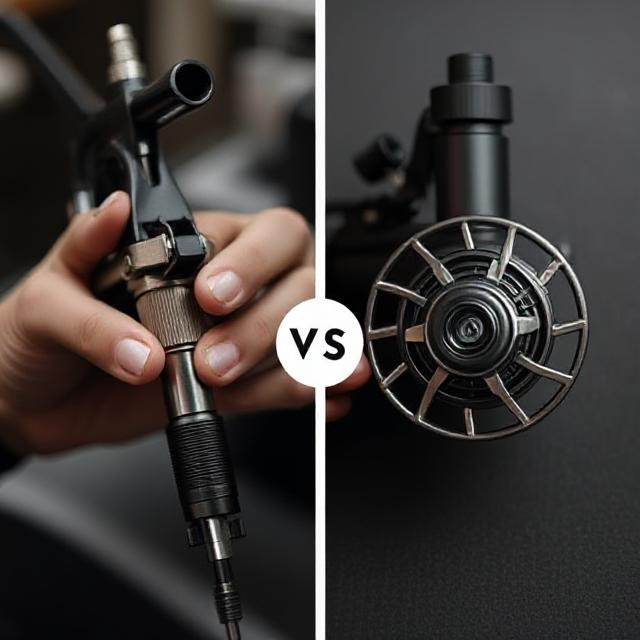
Coil Tattoo Machine
Coil Tattoo Machine vs. Rotary: Which One Is Right for You?
Table of Contents
Introduction to Tattoo Machines
Understanding Coil Tattoo Machines
2.1 How Coil Tattoo Machines Work
2.2 Pros and Cons of Coil Tattoo Machines
Understanding Rotary Tattoo Machines
3.1 How Rotary Tattoo Machines Work
3.2 Pros and Cons of Rotary Tattoo Machines
Coil vs. Rotary: Key Differences
Which Tattoo Machine is Best for You?
Introducing the Dragonhawk Wireless Tattoo Pen Machine
FAQs About Coil and Rotary Tattoo Machines
Conclusion and Summary Table
1. Introduction to Tattoo Machines
Tattoo artists rely on high-quality machines to create detailed, lasting designs. Among the most commonly used tattoo machines are coil and rotary machines, each offering distinct benefits and working mechanisms.
In this article, we’ll explore the differences between coil and rotary tattoo machines, their advantages and disadvantages, and help you determine which machine suits your style.
2. Understanding Coil Tattoo Machines
2.1 How Coil Tattoo Machines Work
A coil tattoo machine operates using electromagnetic coils that move a spring-loaded armature bar, which drives the attached tattoo needle up and down. The machine works by rapidly turning the coils on and off, creating a powerful hammering motion.
2.2 Pros and Cons of Coil Tattoo Machines
Pros:
Powerful & Precise: Coil machines offer stronger needle penetration, making them ideal for thick lines and deep shading.
Better Ink Saturation: The powerful up-and-down motion allows for better pigment embedding in the skin.
Customizable: Artists can modify the machine’s springs, coils, and armature bars for tailored performance.
Affordable: Generally, coil machines are cheaper than rotary machines.
Cons:
Heavier & Noisier: Due to the electromagnetic mechanism, coil machines are heavier and louder, which may cause hand fatigue.
Requires Regular Maintenance: The many mechanical parts need frequent tuning and adjustments.
Steeper Learning Curve: The power and weight make coil machines harder to master, especially for beginners.
3. Understanding Rotary Tattoo Machines
3.1 How Rotary Tattoo Machines Work
A rotary tattoo machine uses a small electric motor to move the tattoo needle in a smooth, continuous motion. Unlike coil machines, which use electromagnetic pulses, rotary machines provide a fluid motion, making them gentler on the skin.
3.2 Pros and Cons of Rotary Tattoo Machines
Pros:
Lightweight & Quiet: Rotary machines are lighter and quieter, reducing artist fatigue.
Less Skin Damage: The smooth motion minimizes trauma to the skin, resulting in faster healing times.
Versatile: Rotary machines can be used for lining, shading, and coloring without the need for frequent adjustments.
Beginner-Friendly: The steady and consistent motion makes it easier to learn compared to coil machines.
Cons:
Less Customization: Rotary machines don’t allow as many adjustments or modifications as coil machines.
Less Power for Thick Lines: The gentle motion makes packing in solid black or heavy shading harder compared to coil machines.
More Expensive: High-quality rotary machines often come at a higher price point than coil machines.
4. Coil vs. Rotary: Key Differences
Feature
Coil Tattoo Machine
Rotary Tattoo Machine
Mechanism
Uses electromagnetic coils
Uses an electric motor
Weight
Heavy
Lightweight
Noise Level
Loud buzzing sound
Quiet
Skin Impact
More trauma
Less trauma
Ink Saturation
Better for bold lines & deep shading
Softer shading, smooth transitions
Versatility
Best for lining & shading separately
Can be used for lining, shading, and color packing
Maintenance
Needs frequent tuning
Low maintenance
Ease of Use
Harder for beginners
Beginner-friendly
Cost
Affordable
More expensive
5. Which Tattoo Machine is Best for You?
If you need powerful ink saturation and bold lines, choose a coil tattoo machine.
If you want a lightweight, low-maintenance, and versatile machine, a rotary machine is ideal.
Beginners should start with a rotary machine due to its ease of use and less skin trauma.
Experienced tattoo artists may prefer a coil machine for precision and deeper penetration.
6. Introducing the Dragonhawk Wireless Tattoo Pen Machine
If you’re looking for an advanced rotary tattoo machine, the Dragonhawk Wireless Tattoo Pen Machine is a top choice.
Key Features of the Dragonhawk Wireless Tattoo Pen Machine:
Next-Generation Body Craftsmanship: Designed to be lightweight, compact, and easy to handle.
Versatile for All Tattoo Styles: Adjustable frequency settings allow tattoo artists to work across different styles and techniques.
Advanced Brushless Motor: Features a 10V/9000RPM brushless motor for superior power, stability, and low noise levels.
Superior Performance: Excels in durability, consistency, and low skin damage.
This machine is an excellent choice for artists who want the precision of a rotary machine with adjustable performance settings.
7. FAQs About Coil and Rotary Tattoo Machines
Q1: Are coil tattoo machines better than rotary machines?
It depends on the tattooing style. Coil machines offer better ink saturation and bold lines, while rotary machines provide smoother shading and versatility.
Q2: Can beginners use coil tattoo machines?
Yes, but coil machines are harder to master. Most beginners start with a rotary machine due to its ease of use.
Q3: Do rotary tattoo machines hurt less?
Yes, rotary machines cause less trauma to the skin, making them less painful than coil machines.
Q4: Which machine lasts longer, coil or rotary?
Both are durable, but coil machines require more maintenance. Rotary machines have fewer moving parts, making them easier to maintain.
Q5: Can I use the Dragonhawk Wireless Tattoo Pen for shading and lining?
Yes! The Dragonhawk Wireless Tattoo Pen Machine is designed for all tattoo styles, including lining, shading, and color packing.
8. Conclusion and Summary Table
Both coil and rotary tattoo machines have unique advantages. Coil machines are powerful and precise, making them perfect for bold lines and deep shading. Rotary machines are lightweight, quiet, and versatile, making them ideal for smooth shading and faster healing times.
Here’s a summary of the key differences:
Factor
Coil Tattoo Machine
Rotary Tattoo Machine
Best for
Bold lines, deep shading
Smooth shading, all styles
Weight
Heavy
Lightweight
Noise Level
Loud
Quiet
Ease of Use
Difficult for beginners
Beginner-friendly
Skin Impact
More trauma
Less trauma
Customization
High
Low
Price
Affordable
More expensive
Maintenance
Requires tuning
Low maintenance
For those seeking an advanced rotary machine, the Dragonhawk Wireless Tattoo Pen Machine offers unparalleled performance, versatility, and ease of use.
Whether you choose a coil or rotary tattoo machine, the most important factor is finding the right tool for your tattooing style and comfort. Happy tattooing! 🎨
Rotary Tattoo Machine
Rotary Tattoo Machine: How It Works and Why It’s Essential for Artists
Rotary Tattoo Machine: How It Works and Why It’s Essential for Artists
A comprehensive guide to understanding rotary tattoo machines, their benefits, and top features.
Table of Contents
Introduction
How a Rotary Tattoo Machine Works
Key Features of a Rotary Tattoo Machine
Spotlight: Ambition MARS-U Wireless Tattoo Machine
Benefits of Using Rotary Tattoo Machines
FAQs
Comparison Table of Features
Introduction
Rotary tattoo machines have revolutionized the tattooing industry by offering precise, smooth, and quiet performance. Unlike traditional coil machines, rotary machines use a motor-driven mechanism that simplifies operation and improves consistency. This article dives deep into how rotary tattoo machines work, their unique features, and why they are favored by professional tattoo artists worldwide.
How a Rotary Tattoo Machine Works
At its core, a rotary tattoo machine uses a rotating motor to drive the needle up and down. This motion is smoother and more consistent compared to coil machines, which rely on electromagnetic coils to create a pulsing effect.
Key Mechanisms
Motor: The motor powers the needle's linear motion.
Cam Wheel: Converts the motor's rotary motion into linear motion for the needle.
Needle Bar: Connected to the cam wheel, it drives the needle into the skin.
Rotary machines are ideal for all tattooing styles, including lining, shading, and coloring, due to their versatility and adjustable stroke lengths.
Key Features of a Rotary Tattoo Machine
Quiet Operation: Rotary machines produce less noise, creating a more relaxed environment for both the artist and the client.
Lightweight Design: Easier to handle for long tattooing sessions.
Adjustable Stroke: Many rotary machines allow for stroke adjustments, enabling precise control for different tattoo styles.
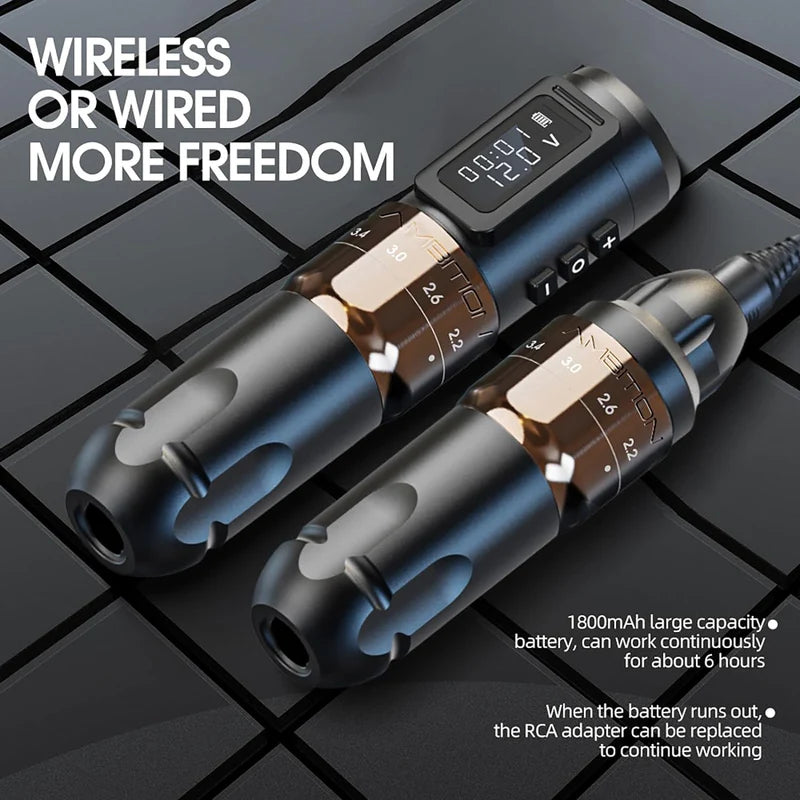
Spotlight: Ambition MARS-U Wireless Tattoo Machine
The Ambition MARS-U Wireless Tattoo Machine is a top choice for professional artists due to its advanced features and superior performance.
Specifications:
Material: Aluminium alloy frame with CNC carving.
Motor: Coreless motor, 10V - 9000 RPM.
Output Voltage: 5V-12V.
Operation Time: Approximately 6 hours.
Battery: 1800mAh, charges in about 2 hours.
Adjustable Strokes: 2.2mm to 4.2mm stroke length, easily changeable using the adjustment knob.
With its customizable stroke lengths, the Ambition MARS-U excels in creating soft black and gray shading, making it a versatile and reliable tool for any artist.
Benefits of Using Rotary Tattoo Machines
Versatility: Suitable for all tattoo styles, from fine lines to intricate shading.
Efficiency: Reduces fatigue with its lightweight and ergonomic design.
Consistency: Ensures smooth and even needle movement, reducing trauma to the skin.
FAQs
1. How do I maintain my rotary tattoo machine?
Regularly clean and sterilize the machine, lubricate moving parts, and inspect for wear and tear to ensure optimal performance.
2. Can rotary tattoo machines be used by beginners?
Yes, their simple design and ease of use make them a great choice for novice tattoo artists.
3. What is the ideal stroke length for shading?
For shading, a longer stroke length (around 3.8mm to 4.2mm) is recommended for smoother gradients.
Comparison Table of Features
Machine Name
Motor Type
Stroke Length
Battery Life
Special Features
Ambition MARS-U
Coreless Motor
2.2mm - 4.2mm
6 hours
Wireless, Adjustable Stroke