

Let us be brutally honest: the tattoo industry has evolved rapidly over the last decade, and the days of spending three hours hand-tracing a complex geometric mandala or a hyper-realistic portrait over a lightbox are over. Time is your most valuable asset in the studio. If you are not utilizing thermal printing technology to generate your stencils, you are losing money, fatiguing your hands before the needle even touches the skin, and capping your daily earning potential.

However, acknowledging that you need a stencil printer is only the first step. The real debate dividing professional artists today centers on form factor and technology. Should you invest in a massive, heavy-duty traditional desktop copier, or should you embrace the sleek, battery-powered wireless portables that have flooded the market? From our experience outfitting thousands of artists, making the wrong choice here will disrupt your workflow and cause daily frustration. In this comprehensive guide, we will analyze the exact Pros and Cons of Portable and Desktop Tattoo Stencil Printers, leaving no stone unturned so you can make an authoritative, informed decision for your studio setup.
Table of Contents
- 1. Summary Comparison: Portable vs. Desktop
- 2. Point 1: Studio Footprint and Mobility
- 3. Point 2: Print Quality, Shading, and Gradients
- 4. Point 3: Connectivity and Workflow Integration
- 5. Point 4: Power Dependency and Reliability
- 6. Point 5: Durability and High-Volume Studio Use
- 7. Point 6: Upfront Investment and Maintenance
- 8. Spotlight: INKSOUL® T08FS Wireless Printer
- 9. Expert Advice: The Regular Printer Myth
- 10. Frequently Asked Questions (FAQs)
- 11. References and Standards
Summary Comparison: Portable vs. Desktop Stencil Printers
We recommend starting with a macro view. Before diving into the granular mechanics, look at this responsive table to understand where these two distinct pieces of hardware shine and where they fail.
| Feature / Metric | Desktop Stencil Printers (Traditional) | Portable Stencil Printers (Modern) |
|---|---|---|
| Size & Weight | Bulky, heavy (often 5-10 lbs), takes up desk space. | Ultra-compact, lightweight (under 2 lbs), fits in a drawer. |
| Connectivity | Primarily USB to PC, or requires feeding a physical paper copy. | Bluetooth direct to iPad/Phone + USB for PC. |
| Power Source | Requires a dedicated 110V/220V wall outlet. | Rechargeable lithium battery (fully wireless operation). |
| Print Capabilities | Excellent for bold linework; terrible at gradients/shadows. | High-resolution (203 dpi), capable of printing smooth shadows. |
| Durability | Built like tanks; designed for non-stop daily studio abuse. | Highly durable but requires care; dropping them can damage sensors. |
| Travel Readiness | Impractical for conventions or guest spots. | The absolute gold standard for traveling artists. |
Point 1: Studio Footprint and Mobility
Desktop Printers: The traditional thermal copier is a behemoth. It requires a dedicated station in your booth. If you run a high-volume street shop where space is abundant, a desktop machine sitting in the corner is perfectly fine. The con? You cannot easily move it. If you are doing a guest spot in another city or working a packed convention like the Philadelphia Tattoo Arts Festival, lugging a 10-pound desktop printer through airport security is an absolute nightmare.
Portable Printers: Portability is where modern tech completely destroys legacy hardware. Portable printers weigh next to nothing and take up virtually no space on your workstation. When you are done, you slide it into a drawer. For artists traveling to conventions, a portable printer is mandatory. The ability to pull it out of your backpack, pair it with your iPad, and print a stencil on the fly right at your client's table is a game-changer.
Point 2: Print Quality, Shading, and Gradients
Desktop Printers: For decades, traditional thermal copiers were built for one thing: burning high-contrast, bold linework onto carbon paper. If you are a traditional Americana artist doing bold borders, desktop printers are fantastic. However, their major flaw is that they operate like old fax machines. They cannot interpret subtle greyscale. If you try to feed a realistic portrait through a legacy desktop copier, it will output a muddy, unreadable blob of purple carbon.
Portable Printers: The advancement in thermal print heads inside modern portable units is staggering. High-end portables are specifically engineered to interpret and print shadows. If you are a black-and-grey realism artist, this is non-negotiable. Being able to print distinct shades of grey allows you to map out your mid-tones perfectly before you ever pick up your machine. To get the best results with these shadows, you must understand your materials; we highly recommend reading our tattoo stencil paper guide to understand how carbon responds to varying thermal temperatures.
Point 3: Connectivity and Workflow Integration
Desktop Printers: We find the workflow of legacy desktop printers to be incredibly frustrating in the modern era. Many older models require you to print your design onto a piece of normal paper using an inkjet printer, and then physically feed that paper into the thermal copier alongside your carbon sheet. It is a slow, two-step process that wastes paper and time.
Portable Printers: Portable printers eliminate the middleman. They utilize Bluetooth connectivity to pair directly with your smartphone or tablet. You draw your design in Procreate on your iPad, resize it, hit print, and the portable unit generates the stencil in seconds. This seamless integration saves hours over a busy workweek. For a deep dive into mastering this workflow, check out our tutorial on how to use tattoo transfer paper effectively with wireless systems.
Point 4: Power Dependency and Reliability
Desktop Printers: A desktop printer plugs into the wall. It has an endless supply of power. You will never have a moment where a client is waiting, and your printer dies halfway through spitting out a back-piece stencil. The reliability of constant AC power is a massive pro for busy, multi-artist street shops.
Portable Printers: Portable units run on internal lithium batteries. While this offers incredible freedom, it introduces battery anxiety. If you forget to charge your unit after a busy Friday, you might find yourself scrambling for a USB-C cable on Saturday morning. You must treat a portable printer like your wireless tattoo machine—charging it must become part of your daily breakdown routine. When equipping your studio, do not just focus on the printer; ensure you have adequate power strips and proper illumination. Many artists source their overhead lighting from a Wholesale Light Fixtures Supplier to ensure their charging stations and work areas are perfectly visible.
Point 5: Durability and High-Volume Studio Use
Desktop Printers: Built with heavy metal and thick plastic chassis, traditional desktop copiers are incredibly rugged. In a shop with six artists constantly feeding paper through it, a desktop machine will take a beating and keep running for a decade. They are the workhorses of the industry.
Portable Printers: While built with high-quality components, the internal thermal print heads of portable machines are highly precise and sensitive. Dropping a portable printer off a workstation onto a hard concrete floor can easily misalign the rollers or damage the thermal array. They are durable, but they demand a baseline level of respect and careful handling that a heavy desktop unit does not.
Point 6: Upfront Investment and Consumables
When analyzing the Pros and Cons of Portable and Desktop Tattoo Stencil Printers, cost is heavily weighted. Desktop copiers from legacy brands can easily cost between $500 and $1,000. For an apprentice or a new artist trying to build out their kit, this is a massive barrier to entry. We often advise new artists looking at tattoo machines for beginners to save their capital for better needles and inks, rather than blowing their entire budget on a legacy desktop copier.
Portable printers are vastly more affordable, often ranging from $150 to $250. Both systems utilize the exact same thermal carbon paper, so consumable costs are identical. By opting for a high-quality portable, you retain capital that can be spent on upgrading to the best tattoo machines 2025 has to offer.
Spotlight: INKSOUL® T08FS Wireless Tattoo Transfer Stencil Printer
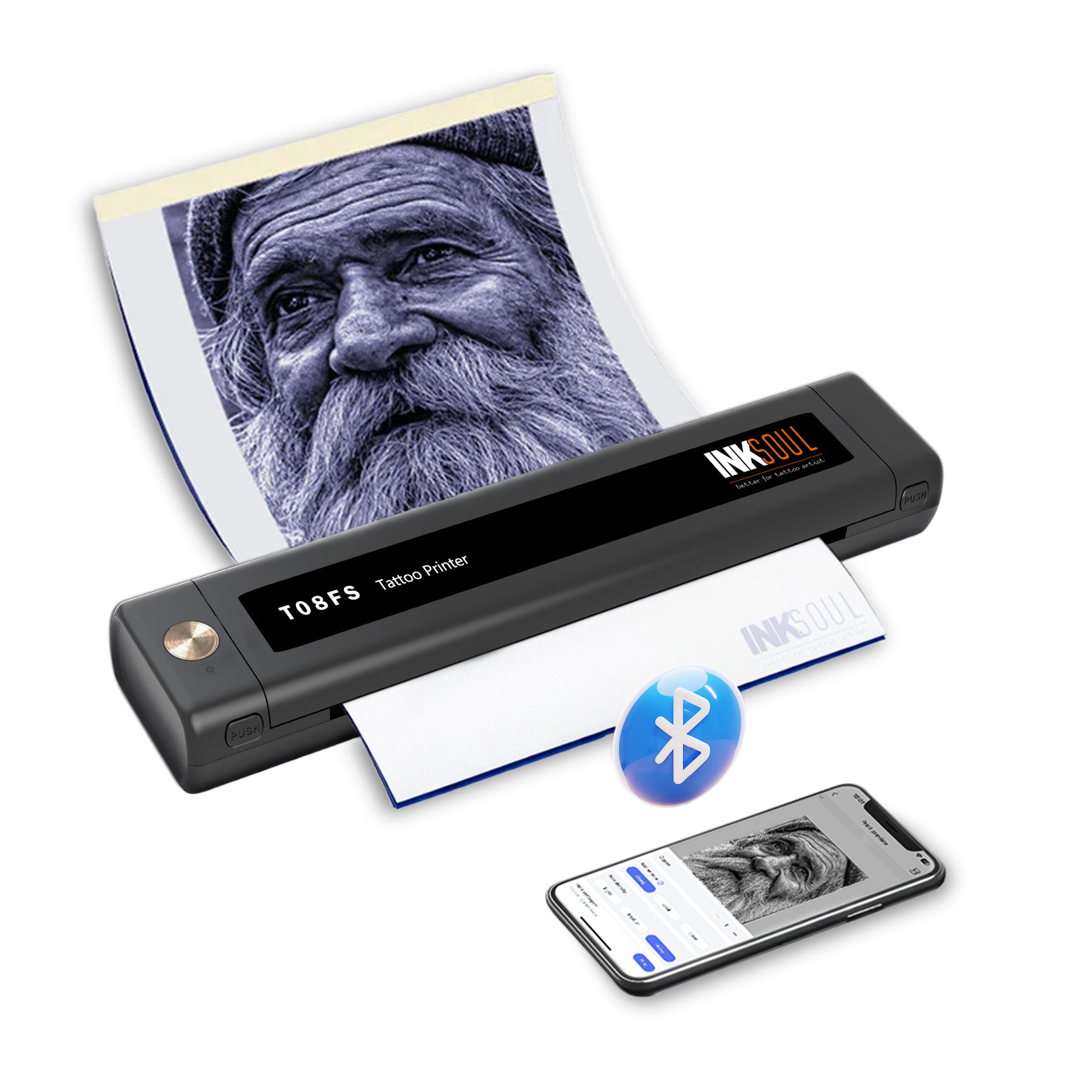
From our experience, if you are looking for the absolute pinnacle of portable thermal technology, the INKSOUL® T08FS is the undisputed champion. We engineered this device specifically to eliminate the flaws of older portable units.
Why the T08FS Dominates the Market:
- Unmatched Shadow Printing: Unlike older machines that only burn harsh lines, the T08FS supports printing delicate shader images alongside crisp linework, making it vital for realism artists.
- Versatile Paper Sizing: It does not lock you into one size. It supports A4 (8.3in x 11.7in), LTR (8.8in x 11in), Legal (8.5in x 14in), and the massive LTR+ (8.5in x 16.5in) for large-scale body panels.
- Robust Power: Equipped with a high-capacity 1200mAh battery, it easily powers through long convention weekends on a single charge.
- Seamless Connectivity: Features lightning-fast Bluetooth connection for mobile phones and tablets, plus a stable USB cable connection for PC users.
- Precision Specs: Utilizing advanced Thermal Printing Technology, it delivers an ultra-sharp 203 dpi resolution at a maximum printing speed of 13-15 mm/s.
- Ultra-Compact: With dimensions of 310 x 68 x 41 mm and weighing merely 0.75 kilograms, it is lighter than most textbooks.
Whether you are outfitting a private studio or traveling the globe, sourcing your gear from a premium Tattoo Supply manufacturer ensures you are working with tools designed by artists, for artists.
Expert Advice: Stop Trying to Use Regular Office Printers
Every single week, we receive emails from desperate apprentices asking if they can just use their HP DeskJet to print stencils. We must address this clearly: standard inkjet and laser printers use liquid ink or dry toner powder. Tattoo stencils require specialized thermal carbon paper that reacts specifically to focused, intense heat.
If you attempt to run thermal transfer paper through a standard office printer, it will either jam the machine entirely or print absolutely nothing onto the carbon sheet. If you are still confused by the mechanics of why this fails, we strongly recommend reading our detailed breakdowns on can a normal printer print tattoo stencils and our expert guide covering whether you can use a regular printer for tattoo transfer paper. Spoiler alert: you cannot. You must invest in a dedicated thermal transfer printer.
Frequently Asked Questions (FAQs)
High-quality portable printers like the INKSOUL T08FS have built-in thermal regulation. However, because they are compact, printing 15 large stencils back-to-back without a break can cause the print head to warm up, which may lead to darker, slightly blurred lines. We recommend letting the unit rest for 60 seconds after every 3-4 continuous prints.
Yes. Portable thermal printers are fully compatible with industry-standard thermal paper, including Spirit, ReproFX, and INKSOUL's proprietary thermal sheets. Just ensure you remove the protective tissue layer before feeding it into the machine.
No. Both desktop and portable tattoo stencil printers utilize thermal printing technology. There are no ink cartridges or toner to replace. The only consumable you will ever need to purchase is the thermal carbon transfer paper itself.
This is usually due to user error during the initial feed. Portable printers lack the heavy, deep feeding trays of desktop models. You must ensure the paper is perfectly flush and even when inserting it into the rollers, and use two hands to guide it gently until the automatic feeder grips it straight.
References and Industry Standards
- Occupational Safety and Health Administration (OSHA) - Bloodborne Pathogens Standard: Guidelines for maintaining a sanitary, cross-contamination-free tattoo studio environment when handling shared equipment like stencil printers.
- U.S. Food and Drug Administration (FDA): Regulations and safety advisories concerning cosmetic products, tattoo inks, and the chemicals used in stencil transfer solutions.
- Journal of Imaging Science and Technology: Academic research detailing the thermal transfer printing process, dpi resolution limits, and the reaction of carbon substrates under targeted heat application.

