

The tattoo industry has undergone a massive technological transformation over the past decade. The era of manually tracing complex designs over a light table is rapidly fading, replaced by digital illustration tools like iPads, Procreate, and highly specialized thermal transfer technology. For professional artists, translating a digital masterpiece into a flawless skin stencil requires precision hardware. Understanding the most critical features for a Bluetooth tattoo stencil printer is essential for maintaining workflow efficiency, ensuring line-art fidelity, and avoiding costly hardware failures during a client session.

At INKSOUL®, we design and engineer professional-grade tattoo equipment tailored to the rigorous demands of modern artists. From our experience working closely with top-tier tattooists globally, we know that a printer is not just an accessory; it is the vital bridge between a digital concept and the physical canvas of human skin. We recommend carefully evaluating the technical specifications of any device before integrating it into your studio. In this authoritative guide, we will break down the most critical features for a Bluetooth tattoo stencil printer, detailing why each component matters for your art.
Table of Contents
- 1. Uncompromising Connectivity and Cross-Platform Integration
- 2. High-Resolution Thermal Print Heads for Micro-Details
- 3. Intuitive User Interfaces and Smart Touch Controls
- 4. Broad Compatibility with Premium Transfer Papers
- 5. Robust Battery Life for True Portability
- 6. Optimal Print Speeds Without Quality Degradation
- The Expert's Choice: INKSOUL® T08FD Specifications
- Why Traditional Printers Fail for Tattoo Stencils
- Summary Table: The 6 Critical Features
- Frequently Asked Questions (FAQs)
- References
1. Uncompromising Connectivity and Cross-Platform Integration
When analyzing the most critical features for a Bluetooth tattoo stencil printer, stable wireless connectivity ranks at the top. A professional studio environment is often filled with electromagnetic interference from power supplies, rotary machines, and other wireless devices. A printer must utilize advanced Bluetooth protocols to ensure a lag-free, uninterrupted connection between your tablet or smartphone and the printing unit.
We recommend devices that support seamless dual-connection capabilities. The ability to connect via Bluetooth to a mobile device while simultaneously supporting a hardwired USB-C connection to a desktop computer provides the ultimate flexibility. A dropped connection halfway through printing a massive back-piece stencil ruins the transfer paper and wastes valuable session time. Superior connectivity ensures that your designs render instantly, making the workflow fast and convenient.
2. High-Resolution Thermal Print Heads for Micro-Details

The rise of micro-realism, fine-line, and intricate geometric tattoo styles demands a printer capable of extreme precision. Thermal print heads operate by selectively heating specialized carbon paper to transfer the design. If the thermal elements are too large or imprecise, fine lines will bleed together, and delicate stippling or dot-work will turn into illegible smudges.
From our experience engineering the thermal tattoo printer ecosystem, the density of the heating elements dictates the fidelity of the stencil. The most critical features for a Bluetooth tattoo stencil printer include a specialized thermal head that can interpret complex digital shading gradients and render them as precise carbon deposits. This ensures that the artist has a perfect roadmap on the skin before the needle ever drops.
3. Intuitive User Interfaces and Smart Touch Controls
Historically, tattoo stencil machines were clunky, heavy pieces of office equipment repurposed for studio use. They featured confusing physical buttons and cryptic error lights. Today, the most critical features for a Bluetooth tattoo stencil printer encompass modern, intelligent user interfaces. An artist should spend their time designing, not troubleshooting hardware.
We highly recommend upgrading to devices that feature smart touch screens. For example, replacing physical buttons with fingertip sliding parameters allows artists to adjust image density, mirror settings, and print depth directly on the device without needing to open a separate app. A dedicated screen provides immediate visual feedback regarding battery life, connection status, and print settings, streamlining the entire setup process.
4. Broad Compatibility with Premium Transfer Papers
A high-end printer is only as good as the medium it prints on. The width of the thermal feed mechanism is a crucial specification. The most critical features for a Bluetooth tattoo stencil printer include a print width capacity of 210-216mm. This accommodates standard A4 and US Letter sizes perfectly, which are the industry standards for tattoo transfer paper.
Furthermore, the internal rollers must be engineered to grip the delicate transfer sheets without wrinkling or jamming. Understanding the chemistry of the paper itself is equally important. To maximize the efficiency of your printer, we advise artists to study our comprehensive tattoo stencil paper guide and review best practices on how to use tattoo transfer paper for flawless application.
5. Robust Battery Life for True Portability
The modern tattoo artist is no longer tethered to a single shop. Guest spots, international tattoo conventions, and private studio setups require hardware that travels easily. Therefore, power autonomy is among the most critical features for a Bluetooth tattoo stencil printer.
A professional unit should contain a high-capacity lithium-ion battery. From our experience, a 1200mAh battery provides the perfect balance between sustained printing power and lightweight portability. It allows an artist to print dozens of highly detailed stencils on a single charge without needing to hunt for an available wall outlet in a crowded convention hall.
6. Optimal Print Speeds Without Quality Degradation
In a busy street shop, time is money. However, in the realm of thermal printing, speed must be carefully balanced against quality. If a printer feeds the paper too quickly, the thermal head does not have adequate time to heat the carbon, resulting in light, patchy stencils. If it feeds too slowly, the carbon can overheat and bleed, ruining fine lines.
We recommend a highly calibrated print speed of 10-15mm/s. This specific velocity ensures that the carbon is transferred with maximum darkness and crispness while still allowing the artist to generate a large stencil in a matter of seconds. This calibrated speed is one of the most critical features for a Bluetooth tattoo stencil printer engineered for professional use.
The Expert's Choice: INKSOUL® T08FD Specifications
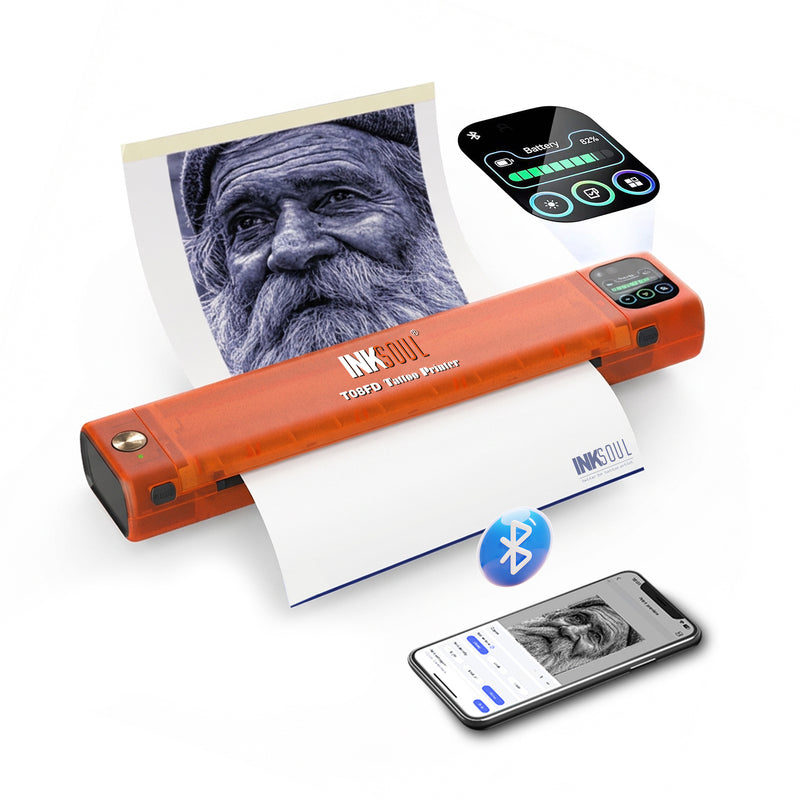
At INKSOUL®, we synthesized all the most critical features for a Bluetooth tattoo stencil printer into a single, flagship device. The INKSOUL® T08FD tattoo transfer printer touch screen is the culmination of rigorous engineering and artist feedback. Embodying our philosophy of Tap. Print. Perfect, this device sets the standard for 2026.
INKSOUL® T08FD Core Specifications
- Interface: 2-inch Smart Touch Screen featuring fingertip sliding parameters.
- Operation: Print instantly — fast and convenient for busy studios.
- Connectivity: Computer and mobile phone can be connected seamlessly.
- Print Speed: Calibrated at 10-15mm/s for optimal line crispness.
- Battery Capacity: 1200mAh lithium-ion for extended, cordless convention use.
- Print Width: 210-216mm, accommodating all standard professional sizes.
- Compatible Supplies: Universal tattoo transfer paper compatibility.
- Dimensions: Ultra-compact at 325x67x40mm.
- Weight: Highly portable at just 745g.
Why Traditional Printers Fail for Tattoo Stencils
A frequent question we receive from apprentices is regarding standard office hardware. Many wonder, can a normal printer print tattoo stencils? The definitive answer is no. Standard inkjet or laser printers utilize liquid ink or powdered toner, which are highly toxic and entirely incompatible with human skin application.
Tattoo transfer requires a specific chemical reaction where thermal energy melts a specialized carbon wax onto a carrier sheet. If you attempt to use a regular printer for tattoo transfer paper, the paper will either jam the delicate ink rollers or, in the case of a laser printer, the intense heat of the fuser will melt the transfer wax inside the machine, causing catastrophic hardware failure. A dedicated thermal printer is an absolute necessity.
Summary Table: The 6 Critical Features
| Critical Feature | Why It Matters for Tattoo Artists | INKSOUL® T08FD Standard |
|---|---|---|
| Bluetooth Connectivity | Eliminates cables; allows direct printing from iPads/tablets. | Dual mobile and PC connection. |
| Thermal Resolution | Ensures fine-line and dot-work fidelity without blurring. | Precision micro-thermal print head. |
| Touchscreen Interface | Speeds up workflow and parameter adjustments without apps. | 2-inch smart touch screen with sliding parameters. |
| Battery Capacity | Enables portability for conventions and guest spots. | 1200mAh rechargeable lithium-ion battery. |
| Paper Width Compatibility | Prevents cropping on large back-pieces and sleeve stencils. | 210-216mm wide-feed mechanism. |
| Calibrated Print Speed | Balances fast output with dark, crisp carbon transfer. | Optimized 10-15mm/s feed rate. |
Frequently Asked Questions (FAQs)
References
To further understand the safety, efficacy, and technological standards of thermal printing mechanisms and dermal applications, we encourage artists to review the following authoritative resources: